H
Hannah Morgan
Guest
- Thread Author
- #1
A traditional resume is so limiting. It doesn’t allow you to really tell your story. See these three visual resume examples created using Powerpoint and shared on SlideShare! Why not try a “presume” or presentation resume?!
Here are some more reasons to consider supplementing your resume with a visual summary of your career highlights and offer a glimpse of what makes you special or different.
It is a noisy world, filled with distractions and short-attention spans. I am not suggesting that everyone who sees your presentation resume will click through every slide, but…just maybe, it will catch the attention of the right person!
You don’t need technical skills to create a stunning presentation. Basic PowerPoint familiarity is all you need. What you do need is a plan. In The Infographic Resume (McGraw Hill Education), I include tips for creating a memorable presentation and include a couple of different storytelling formulas.
Before you start throwing words on a slide, create a storyboard or outline of how you want your presentation to flow. What information is vital to include and what proof do you have to back it up?
Remember, the story you tell isn’t about your career. It’s what you want people to know about your career (the short version).
The story has to be interesting and relevant to your future employer. So think about what their problems are and how you’ve solved similar problems. What makes you special or different from the thousands of other people with your qualifications?
When you create your presentation resume, be sure to use royalty-free, attribution-free photos. You will find 3 great resources for photos here. But feel free to also use screenshots or photos you take yourself.
Next, pick 2-3 fonts that aren’t boring. This is a standard best-practice in creating presentations.
And finally, make sure you include a link to your LinkedIn profile and other profiles you want to feature.
Now you need to name your presentation appropriately. Obviously, your name should be included. Job title would be nice too. You could also include the word resume, but that isn’t vital information.
Here is what the settings will look like on SlideShare.
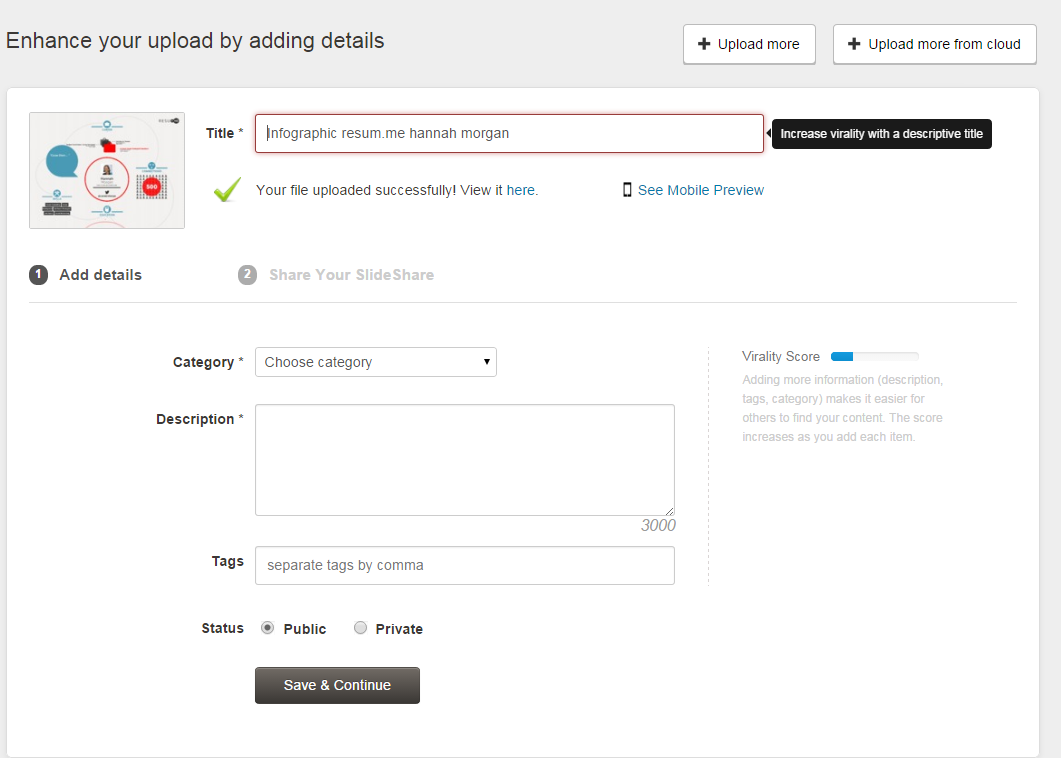
Selecting the right category ensures it hits the right audience. I would recommend Business over career.
Your Description has to be compelling and keyword rich. You have 3000 characters. Use them well.
Use Tags reinforce keywords, search terms you want to be found for. You can use up to 20 tags.
As a free user, your SlideShare upload will have to be Public.
Add your presentation to your LinkedIn profile (in the Featured section)! And share it on every social network you belong to!
Here’s how to introduce your visual resume/presentation resume. Don’t just say, “Here’s my presume” or “check out my new resume.” Instead, ask for feedback from your network or ask them to share it if they like it!
I created this presentation resume to provide more information about my career as a [job title/occupation] ! What did I forget? What did you like? [link to SlideShare file]
There are many examples of these presentation resumes/presumes on SlideShare. So feel free to search for more, but these three grabbed my attention.
What I liked about this visual resume example was the simple impact of the graphics and the questions asked up front. He’s done a very nice job showing his impact in previous jobs. The bonus is his video at the end. Video can be tricky. Though he sounds a little stiff, you still get a sense of his professionalism. Obviously, this presentation and video took a lot of work, which shows his dedication.
Creative and visual Resume Presentation or presume from Sergey Kryukov
This presentation is fun and conveys personality. It is loaded with photos of himself, which is Ok. He includes the types of problems he solves and overall, his slides kept me clicking along! By the way, he missed the opportunity to describe his presentation. I think this would help.
Chris Shade Presume: What do I do? from Chris Shade
Learn from this marketing maven. Michelle’s title is compelling and keyword dense! Great job! The story she tells, her message, focuses on the needs/wants/desires of the potential employer! Plus, her title, description, and tags use keywords she wants to be known for and employers would search for.
7 Outstanding Reasons to Hire Michelle Chance-Sangthong. My Visual Resume. from Michelle Chance-Sangthong
Instead of asking your network to circulate a boring resume, ask them to share your presentation resume instead!

Hannah Morgan
Hannah Morgan speaks and writes about job search and career strategies. She founded CareerSherpa.net to educate professionals on how to maneuver through today’s job search process. Hannah was nominated as a LinkedIn Top Voice in Job Search and Careers and is a regular contributor to US News & World Report. She has been quoted by media outlets, including Forbes, USA Today, Money Magazine, Huffington Post, as well as many other publications. She is also author of The Infographic Resume and co-author of Social Networking for Business Success.
www.careersherpa.net
https://www.linkedin.com/in/hannahmorgan/
https://www.facebook.com/careersherpa/
https://twitter.com/careersherpa
https://www.instagram.com/careersherpa/
The post 3 Inspiring Visual Resume Examples Using PowerPoint appeared first on Career Sherpa.
Here are some more reasons to consider supplementing your resume with a visual summary of your career highlights and offer a glimpse of what makes you special or different.
- Demonstrate your creativity and communication skills.
- Differentiate yourself.
- Build online content, which is searchable and findable on the web.
It is a noisy world, filled with distractions and short-attention spans. I am not suggesting that everyone who sees your presentation resume will click through every slide, but…just maybe, it will catch the attention of the right person!
Plan Your Story
You don’t need technical skills to create a stunning presentation. Basic PowerPoint familiarity is all you need. What you do need is a plan. In The Infographic Resume (McGraw Hill Education), I include tips for creating a memorable presentation and include a couple of different storytelling formulas.
Before you start throwing words on a slide, create a storyboard or outline of how you want your presentation to flow. What information is vital to include and what proof do you have to back it up?
Remember, the story you tell isn’t about your career. It’s what you want people to know about your career (the short version).
The story has to be interesting and relevant to your future employer. So think about what their problems are and how you’ve solved similar problems. What makes you special or different from the thousands of other people with your qualifications?
Create Your Presentation
When you create your presentation resume, be sure to use royalty-free, attribution-free photos. You will find 3 great resources for photos here. But feel free to also use screenshots or photos you take yourself.
Next, pick 2-3 fonts that aren’t boring. This is a standard best-practice in creating presentations.
And finally, make sure you include a link to your LinkedIn profile and other profiles you want to feature.
Naming and Keywords
Now you need to name your presentation appropriately. Obviously, your name should be included. Job title would be nice too. You could also include the word resume, but that isn’t vital information.
Here is what the settings will look like on SlideShare.
Describe Your Presentation Resume
Selecting the right category ensures it hits the right audience. I would recommend Business over career.
Your Description has to be compelling and keyword rich. You have 3000 characters. Use them well.
Use Tags reinforce keywords, search terms you want to be found for. You can use up to 20 tags.
As a free user, your SlideShare upload will have to be Public.
Sharing
Add your presentation to your LinkedIn profile (in the Featured section)! And share it on every social network you belong to!
Here’s how to introduce your visual resume/presentation resume. Don’t just say, “Here’s my presume” or “check out my new resume.” Instead, ask for feedback from your network or ask them to share it if they like it!
I created this presentation resume to provide more information about my career as a [job title/occupation] ! What did I forget? What did you like? [link to SlideShare file]
3 Visual Resume Examples That Rock
There are many examples of these presentation resumes/presumes on SlideShare. So feel free to search for more, but these three grabbed my attention.
Example 1
What I liked about this visual resume example was the simple impact of the graphics and the questions asked up front. He’s done a very nice job showing his impact in previous jobs. The bonus is his video at the end. Video can be tricky. Though he sounds a little stiff, you still get a sense of his professionalism. Obviously, this presentation and video took a lot of work, which shows his dedication.
Creative and visual Resume Presentation or presume from Sergey Kryukov
Example 2
This presentation is fun and conveys personality. It is loaded with photos of himself, which is Ok. He includes the types of problems he solves and overall, his slides kept me clicking along! By the way, he missed the opportunity to describe his presentation. I think this would help.
Chris Shade Presume: What do I do? from Chris Shade
Example 3
Learn from this marketing maven. Michelle’s title is compelling and keyword dense! Great job! The story she tells, her message, focuses on the needs/wants/desires of the potential employer! Plus, her title, description, and tags use keywords she wants to be known for and employers would search for.
7 Outstanding Reasons to Hire Michelle Chance-Sangthong. My Visual Resume. from Michelle Chance-Sangthong
Did I Say These Were Shareable?
Instead of asking your network to circulate a boring resume, ask them to share your presentation resume instead!
Re-Cap
- Tell a great story with great visuals.
- Focus on your target audience (needs/wants/desires)
- Use the right keywords in the title, description, and tags.
- Embed it into your LinkedIn profile and share, share, share!
Hannah Morgan
Hannah Morgan speaks and writes about job search and career strategies. She founded CareerSherpa.net to educate professionals on how to maneuver through today’s job search process. Hannah was nominated as a LinkedIn Top Voice in Job Search and Careers and is a regular contributor to US News & World Report. She has been quoted by media outlets, including Forbes, USA Today, Money Magazine, Huffington Post, as well as many other publications. She is also author of The Infographic Resume and co-author of Social Networking for Business Success.
www.careersherpa.net
https://www.linkedin.com/in/hannahmorgan/
https://www.facebook.com/careersherpa/
https://twitter.com/careersherpa
https://www.instagram.com/careersherpa/
The post 3 Inspiring Visual Resume Examples Using PowerPoint appeared first on Career Sherpa.